
GA4 Use Cases: Data-Driven Marketing to Grow Revenue

GA4 Use Cases: Data-Driven Marketing to Grow Revenue

Oct 22, 2025

Google Analytics
Google Analytics

"GA4 seems difficult..." "I don't really understand how to use it..." Do you feel this way?

Google Analytics 4 (GA4) is gaining attention as an evolved data analysis tool. However, due to its multifunctionality, many may feel confused about where to start. If you can master GA4, you can analyze the access status of websites and apps in detail and derive specific measures to accelerate business growth.

This article introduces 9 use cases of GA4, explaining effective usage in various business scenes such as e-commerce site management, advertising operations, and SEO measures. Please learn practical data analysis strategies that lead to concrete results such as increased sales, improved drop-off rates, and enhanced customer satisfaction in this article.

Maximize Marketing Results with GA4! Learn Success Tips from 9 Real Cases

Have you completed the introduction to GA4 but are struggling with specific utilization methods? GA4 is multifunctional, requiring strategic data analysis and practical measures to maximize its potential. This article presents 9 use cases of GA4 in various business scenarios, explaining specific success tips that lead to maximizing marketing results.

Case Study 1: Contributing to Increased Sales of E-commerce Sites! Discover Optimal Measures through Customer Behavior Analysis

In e-commerce sites, GA4 becomes a powerful tool for analyzing customers' purchasing behaviors in detail. For example, by analyzing the inflow routes to product pages, the addition rates to the cart, and the steps leading to purchase, you can gain a deep understanding of customer needs and derive optimal measures. Specifically, by identifying pages with high drop-off rates and improving UI/UX or creating more attractive product presentations, you can enhance conversion rates.
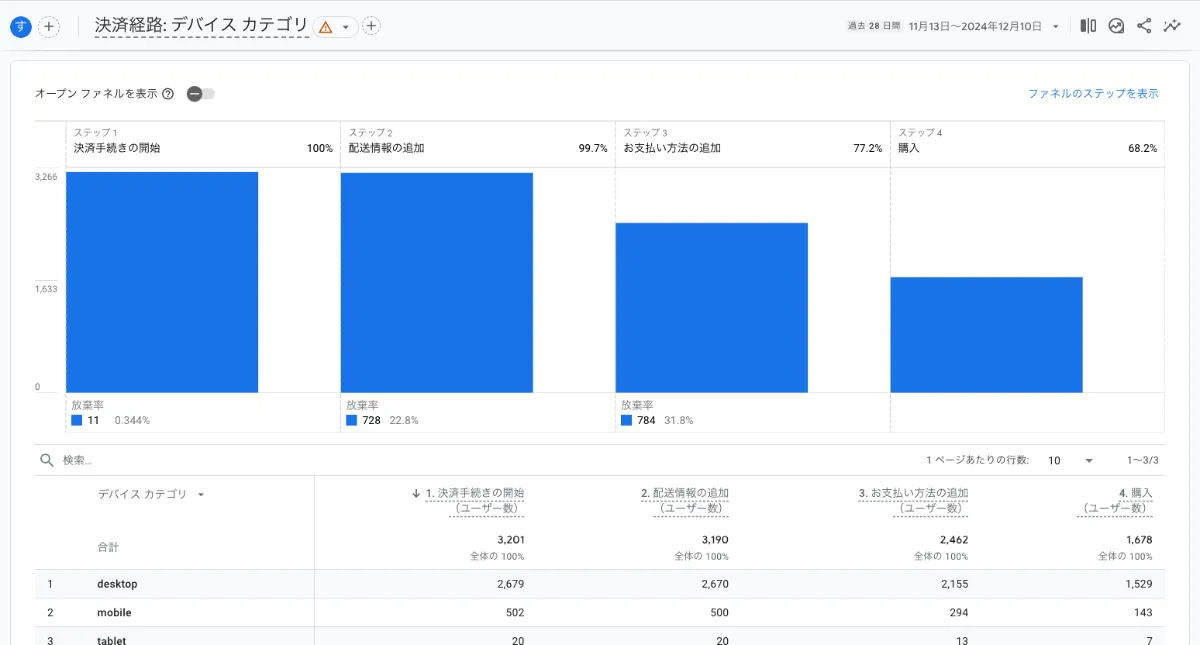
顧客行動分析

Case Study 2: Dramatically Improving Drop-off Rates! Enhancing User Experience through On-site Behavior Analysis

By using GA4's on-site behavior analysis feature, you can gain a detailed understanding of how users behave within the site. By analyzing time spent on each page, bounce rates, and scroll depth, you can identify bottlenecks in user experience and draft specific measures that lead to drop-off rate improvement. For example, by reviewing content, improving pathways, and optimizing page load speed, you can enhance user satisfaction.
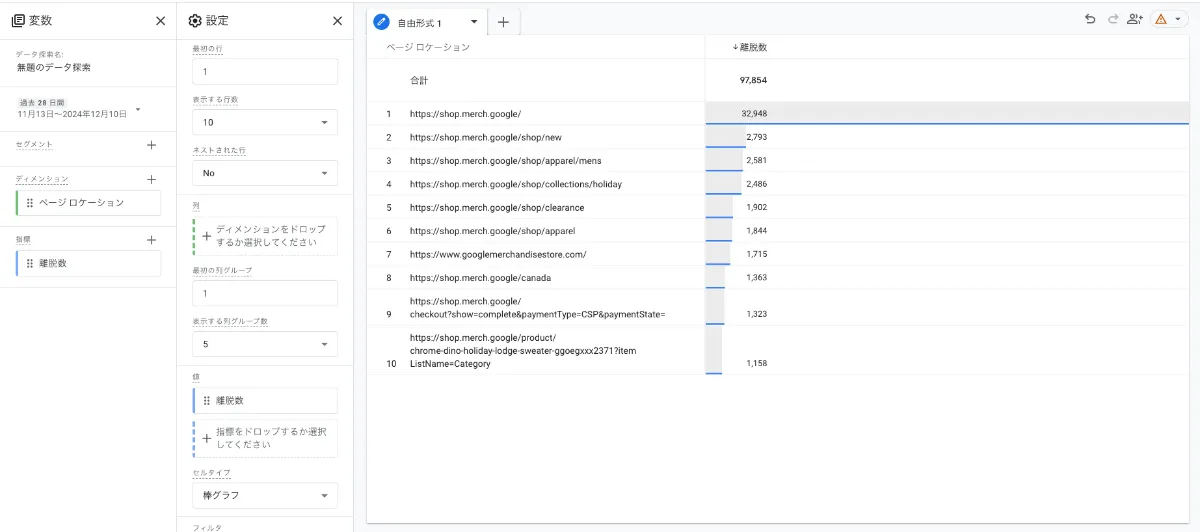
離脱率分析

Case Study 3: Measuring the Effectiveness of Content Marketing! Identifying Success Factors through Engagement Analysis

GA4 is also effective for measuring the effectiveness of content marketing. By analyzing engagement metrics (view time, page views, share numbers, etc.) of blog articles and videos, you can quantitatively evaluate which content is accepted by users and which content is effective. By identifying success factors and continuing to scale similar measures, you can improve the overall results of your content marketing.
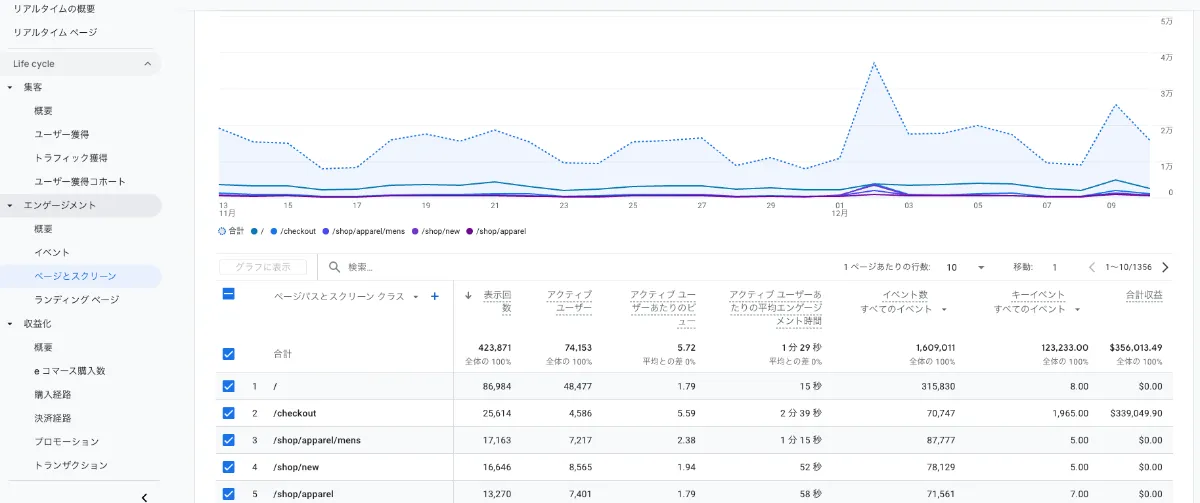
Case Study 4: Maximizing Lead Acquisition! Improving Conversion Rates through Form Optimization

For websites aimed at acquiring leads, form analysis using GA4 is crucial. By analyzing the number of input fields, drop-off rates, and completion rates of forms, you can improve the UI/UX of the forms and maximize lead acquisition numbers. By removing unnecessary fields or reducing the effort required to input information, you can achieve increased conversion rates.

Case Study 5: Enhancing Customer Satisfaction with Personalization Strategies! Deepening Customer Understanding through Segment Analysis

By utilizing GA4's segmentation feature, you can classify users based on various attributes (country, age, gender, interests, etc.) and execute personalized marketing measures. By displaying optimal content and advertisements for each segment, you can improve customer satisfaction and enhance engagement.
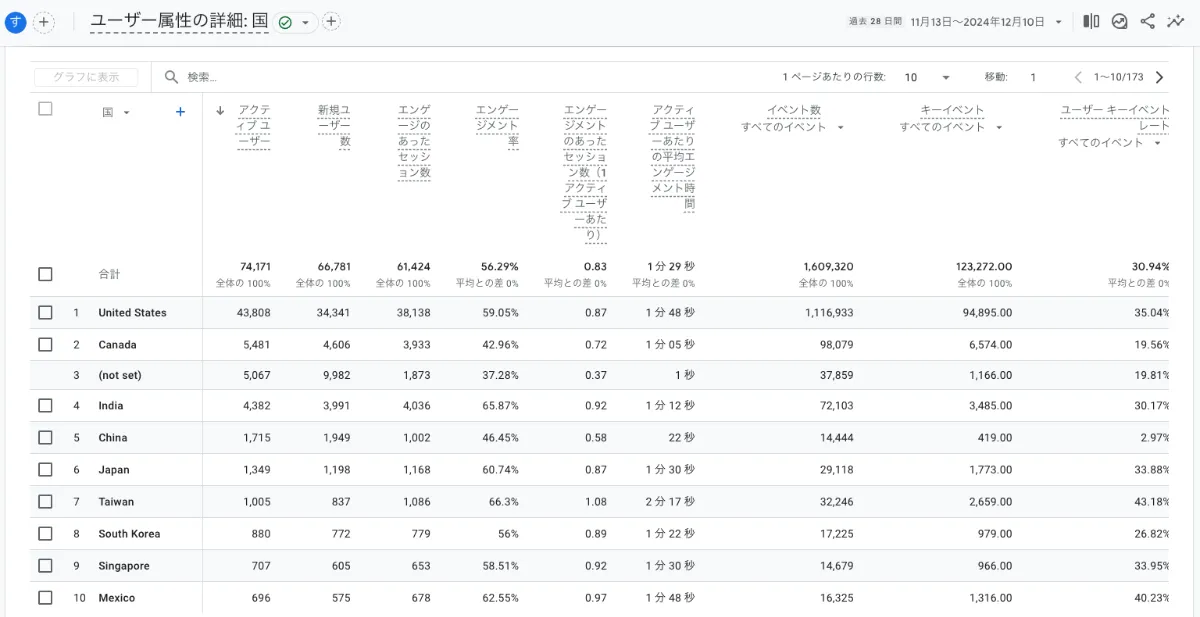
セグメント分析

Case Study 6: Promoting App Growth! Understanding User Behavior through In-app Event Analysis

In mobile apps, GA4 provides a detailed understanding of user behavior through in-app event analysis. By analyzing app feature utilization, user's time spent, and in-app purchase status, it helps identify areas for app improvement and growth strategy formulation. For instance, if the utilization rate of specific features is low, you can revitalize the app through UI/UX improvements or promotions.
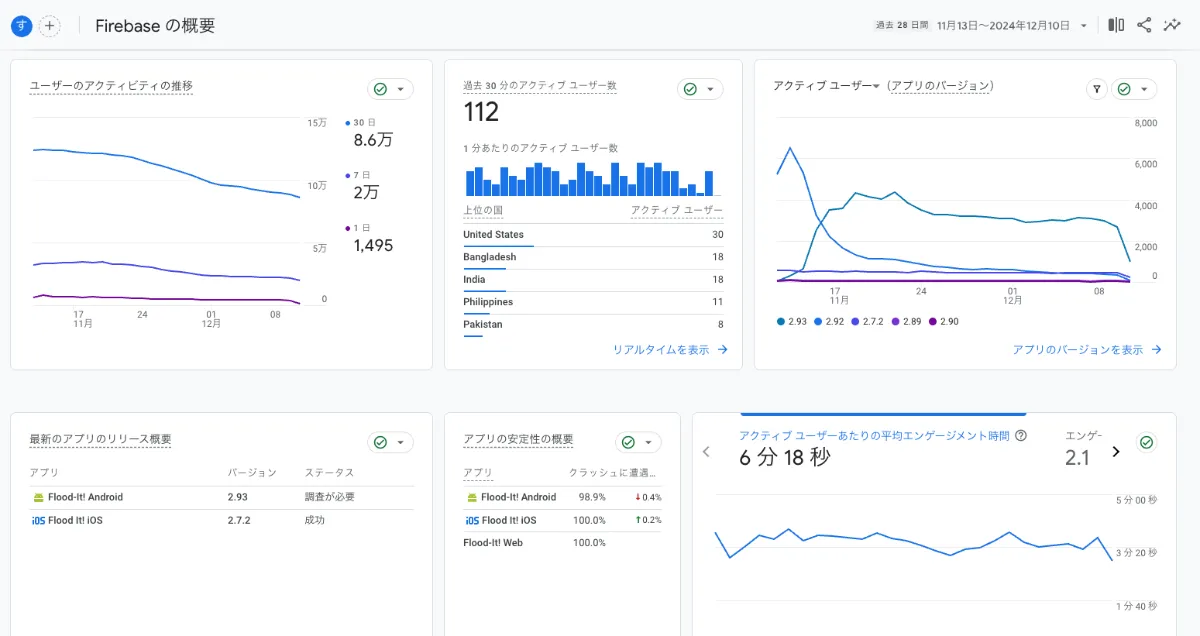
アプリ内イベント分析

Case Study 7: Optimizing Video Strategy through YouTube Channel Analysis! Achieving Improved Viewer Retention Rates

If you operate a YouTube channel, GA4 can help in analyzing viewer behavior. By analyzing view time, retention rates, and play counts, you can identify areas for improving video content and plan more effective video strategies. By identifying parts of the video with low retention rates, you can enhance viewer engagement through video editing and content reviews.

Case Study 8: Understanding the Overall Picture through Cross-platform Analysis! Maximizing Marketing ROI

GA4 can integratively analyze data from multiple platforms including websites, apps, and YouTube. By conducting cross-platform analysis, you can comprehensively understand the effectiveness of overall marketing campaigns and devise strategies to maximize ROI (Return on Investment). By analyzing the interconnectivity of each platform, you can implement more efficient marketing measures.

Case Study 9: Predictive Analysis for Foreseeing Future Trends! Gaining Competitive Advantage through Proactive Strategies

GA4 also has the functionality to predict future trends based on past data. By utilizing predictive analysis, you can promptly capture market changes and devise proactive strategies. By predicting the movements of competitors and shifts in user needs, you can gain a competitive edge through appropriate measures.

These case studies demonstrate a portion of GA4's potential. By effectively utilizing GA4's features in accordance with your business needs, you can maximize marketing results.
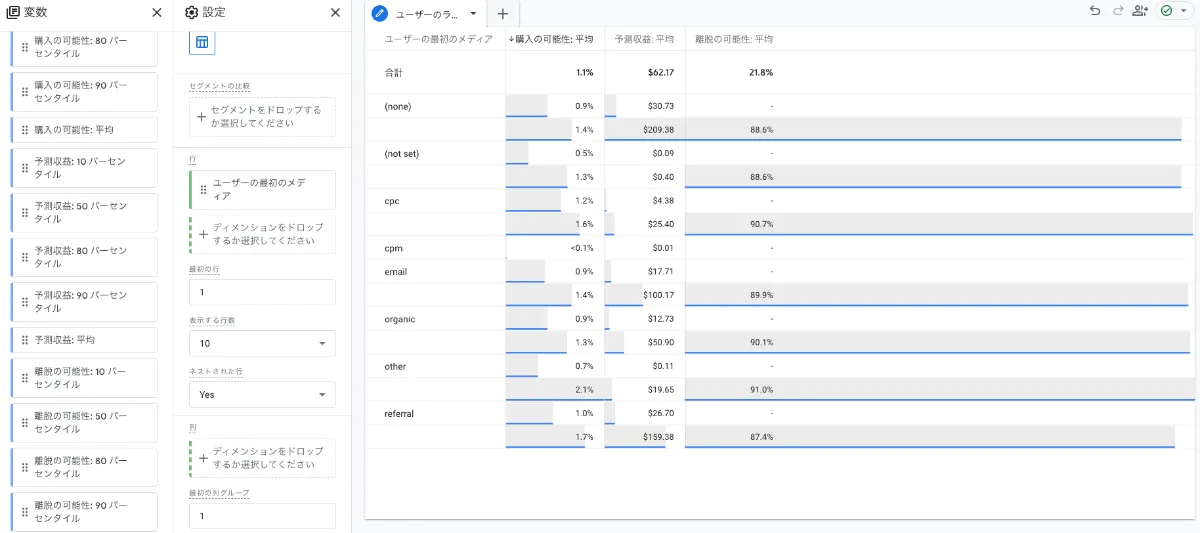
GA4予測機能

Fully Utilize GA4 on E-commerce Sites! Specific Measures for Increasing Sales

Utilizing GA4 is essential for aiming to improve sales on e-commerce sites. GA4 is not just an access analysis tool but a powerful weapon that deeply understands customer behavior and derives specific measures that lead to increased sales. In this section, we will discuss three important aspects of the application of GA4 in e-commerce sites.

1. Analyzing Product Pages to Stimulate Purchase Intent! Data Utilization Techniques Leading to Improved CVR

Product pages are the area with the most direct impact on sales on e-commerce sites. By utilizing GA4, you can pinpoint improvement points on product pages based on data and realize an increase in conversion rates (CVR).


Analysis Indicator

Analysis Method

Example of Improvement Measures

Page Views

Compare page views of each product page to identify popular and unpopular products.

Strengthen the appeal points of unpopular products or review the product page itself.

Average Session Duration

An analysis of duration spent on product pages measures user interest levels.

Consider enriching product information, adding high-quality images, and utilizing video content.

Bounce Rate

Analyze the percentage of immediate departures from product page access.

Review clarity of product information, improve design, and suggest related products.

Add to Cart Click Rate

Analyze the click rate of the add to cart button.

Consider improvements to the button layout, design, and appeal language.

Conversion Rate (CVR)

Analyze the purchase rate from product pages.

Consider reviewing price, shipping, payment methods, and conducting campaigns.

By comprehensively analyzing these indicators, you can identify issues with product pages and implement effective improvement measures. For example, if the bounce rate is high for a product page, enhancing product image quality or adding more detailed product descriptions can extend user duration and boost purchase intent.

2. Maximizing Promotion Effects! Building Optimal Advertising Strategies through Campaign Analysis

GA4 is highly effective for measuring campaign performance. By analyzing access conditions, conversion numbers, and customer behaviors during the campaign period in detail, you can assist in optimal budget allocation and the construction of more effective promotional strategies.


Analysis Indicator

Analysis Method

Example of Improvement Measures

Conversion Number by Campaign

Compare purchase and inquiry numbers for each campaign.

Continue effective campaigns and review those with low effectiveness.

ROI by Advertising Medium

Compare conversion numbers and advertising costs from each advertising medium and calculate ROI.

Concentrate the budget on high ROI mediums.

Customer Behavior during the Campaign Period

Analyze user on-site behaviors during the campaign period.

Improve pathways to the campaign page and the design of campaign banners.

Response by Customer Segment

Analyze the effectiveness of campaigns for specific customer segments (e.g., age, gender, purchase history).

Create optimized advertising creatives and messages for each segment.

By utilizing campaign analysis with GA4, you can identify which advertising channels are the most effective and which customer segments respond best to campaigns, avoiding wasted advertising costs and constructing effective advertising strategies. For instance, if the conversion rate from a particular advertising medium is low, it may necessitate reviewing advertising creatives or targeting.

3. Measures to Improve Customer Lifetime Value (LTV)! Analysis Techniques to Increase Repeat Rates

For the sustainable growth of e-commerce sites, enhancing customer lifetime value (LTV) is crucial. GA4 supports the analysis of repeat customers' behavior patterns and the formulation of measures that lead to increased LTV.


Analysis Indicator

Analysis Method

Example of Improvement Measures

Repeat Rate

Analyze the ratio of first-time purchasers to repeat customers.

Provide special discounts or offers for repeat customers.

LTV by Customer Segment

Analyze LTV by customer segment and identify high LTV and low LTV customers.

Strengthen measures to retain high LTV customers and implement strategies to enhance engagement for low LTV customers.

Customer Purchase Frequency

Analyze purchase frequency for each customer.

Consider implementing a subscription program and recommending products through newsletters.

Average Purchase Amount per Customer

Analyze the average purchase amount for each customer.

Consider proposing high-priced items and implementing upselling and cross-selling strategies.

By analyzing indicators such as repeat rates and LTV, you can effectively implement measures to enhance customer loyalty. For example, providing special discounts or benefits for repeat customers can increase engagement and lead to improved LTV.

By effectively combining these measures, you can greatly enhance sales on e-commerce sites. Utilizing GA4 facilitates data-driven decision-making and is an essential element for the success of e-commerce sites.

The Strongest Collaboration between GA4 and Google Ads! Advertising Effect Measurement and Optimization Strategy

By linking Google Analytics 4 (GA4) with Google Ads, you create a powerful tool for accurately measuring and optimizing the effectiveness of advertising campaigns. The benefits of linking both are immeasurable compared to using them individually. In this section, we will explain the measurement of effectiveness and optimization strategies resulting from the collaboration between GA4 and Google Ads, alongside specific methods and success examples.

Visualize Conversion Paths! Optimizing Advertising Investments through Attribution Analysis

One of GA4's powerful features is attribution analysis. This analysis method details the pathway users take to conversion and clarifies which advertising channels and touchpoints are the most effective. Compared to the traditional last-click attribution, it allows for more accurate effectiveness measurement, aiding in optimizing advertising investments.


Attribution Model

Description

How to Use in GA4

Last Click

A model that attributes all conversions to the last clicked advertisement. While simple, it may overlook the influence of other touchpoints.

Available in GA4, but it is important to compare it with other models.

Data-Driven Attribution

A model that utilizes GA4's machine learning to automatically calculate the contribution of each touchpoint. Achieves the most accurate attribution.

Can be set automatically in GA4. Higher accuracy is achieved with more conversions.

Linear

A model that evenly distributes value to all touchpoints along the conversion pathway.

Effective when you want to equally evaluate the contribution of each touchpoint.

Time Decay

A model that considers touchpoints closer to conversions to have higher value.

Effective when you want to emphasize recent ad effectiveness.

By comparing and reviewing these attribution models, you can determine which channels to concentrate advertising budgets on, which creatives were the most effective, and so on, revealing concrete measures. Optimizing budget allocation based on results aims to maximize ROI (Return on Investment).

Improving Advertising Creatives with Data-Driven Approaches! Realizing Effective Advertising Delivery through A/B Testing

By linking GA4 with Google Ads, you can effectively conduct A/B testing of advertising creatives. Deliver different versions of the advertising creatives (images, texts, videos, etc.) simultaneously, compare click rates and conversion rates with GA4, and identify the most effective creative.

Using GA4's custom reports and segmentation features, it is also possible to deliver optimal creatives to specific user segments. For example, personalizing creatives based on age or interests can lead to improved conversion rates.

Furthermore, utilizing GA4's real-time report feature enables monitoring the status of ad delivery in real time, allowing for adjustments to creatives or bidding strategies as necessary. Data-driven rapid decision-making contributes to maximizing advertising effectiveness.

The collaboration between GA4 and Google Ads is not limited to mere data integration but represents a powerful combination that enables strategic advertising operations based on data. Through effective utilization, achieve optimization of advertising investments and business growth.

Analyze Customer Behavior Thoroughly with GA4! Find Hints for Website Improvement

GA4 is a powerful tool that enables detailed analysis of visitor behavior on websites. By visualizing not only the number of accesses but also how users behave on the site and the paths they take when exiting, you can gain valuable insights that lead to website improvements. This section explains specific methods for utilizing GA4 to thoroughly analyze customer behaviors and find hints for website improvements.

Visualizing User Behavior Flows! Identifying Drop-off Points and Planning Improvements

GA4's user behavior flow report visually displays how users move around the site. By utilizing this report, you can easily understand which pages users are exiting from and how they are moving from one page to another. By identifying pages with high drop-off rates and analyzing the causes, it becomes possible to plan improvement measures.


Analysis Item

Specific Analysis Method

Example of Improvement Measures

Identifying High Drop-off Rate Pages

Identify high drop-off rate pages using user behavior flow reports. By comparing the drop-off rates for each page, you can narrow down problematic pages.

Review page content to make it clear and attractive to users. Improve page loading speed. Enhance navigation so users can easily access their desired pages.

Analyzing User Flow Paths

By analyzing which pages users move from and to, you can grasp user interests and concerns. Discovering unexpected flow paths can help verify if there are issues with site structure or content placement.

Review the site map to make it intuitively understandable for users. Link pages with high relevance to optimize user pathways.

Deepening Behavior Analysis through Event Analysis

By tracking events such as button clicks and form submissions, you can analyze specific user behaviors. For example, if the click rate for a specific button is low, the design or positioning of that button may need to be reconsidered.

Review event tracking settings to capture more user behaviors. Improve website design or functionality based on event data.

By improving the website's design, content, navigation, etc., based on these analysis results, you can enhance the user experience and link it to increased conversion rates.

Understanding User Interest Areas through Heatmap Analysis! UI/UX Optimization for Increased Conversion Rates

Heatmap analysis visually indicates which parts of a website users are focusing on. By using heatmap tools compatible with GA4, you can visualize user gaze, clicks, and scrolling movements to accurately grasp user interest areas. This enables UI/UX (User Interface/User Experience) optimization, potentially leading to increased conversion rates.


Type of Heatmap

Analysis Content

Examples of Improvement Measures

Click Heatmap

Indicates which parts users click on the most. If important elements like CTA buttons are not being clicked, the design or positioning needs to be reconsidered.

Design CTA buttons to make them more noticeable. Improve button placement. Review button text.

Scroll Heatmap

Indicates how much users are scrolling through the page. If the bottom part of the page is not getting scrolls, the content may not be capturing user interest.

Improve the headings of content. Make the content clearer and more attractive. Reconsider page structure.

Mouse Movement Heatmap

Indicates the movement of users' mouse cursors. By comparing where users focus their gaze to where they do not, it can confirm if there are issues with the website's design.

Position important information more prominently. Remove unnecessary elements. Review the website design.

Based on insights gained from heatmap analysis, improving the design and layout of the website can enhance user dwell time and engagement, ultimately leading to increased conversion rates.

Strengthening SEO Measures with GA4! Aim for Higher Rankings through Search Flow Analysis

GA4 contributes significantly not only to analyzing website traffic but also to strengthening SEO measures. By analyzing the behavior of users who accessed from search engine results in detail, you can make improvements to content and optimize the website to aim for higher search rankings.

Understanding User Needs through Search Query Analysis! Content Optimization for Improving Search Rankings

Utilizing GA4's

"GA4 seems difficult..." "I don't really understand how to use it..." Do you feel this way?

Google Analytics 4 (GA4) is gaining attention as an evolved data analysis tool. However, due to its multifunctionality, many may feel confused about where to start. If you can master GA4, you can analyze the access status of websites and apps in detail and derive specific measures to accelerate business growth.

This article introduces 9 use cases of GA4, explaining effective usage in various business scenes such as e-commerce site management, advertising operations, and SEO measures. Please learn practical data analysis strategies that lead to concrete results such as increased sales, improved drop-off rates, and enhanced customer satisfaction in this article.

Maximize Marketing Results with GA4! Learn Success Tips from 9 Real Cases

Have you completed the introduction to GA4 but are struggling with specific utilization methods? GA4 is multifunctional, requiring strategic data analysis and practical measures to maximize its potential. This article presents 9 use cases of GA4 in various business scenarios, explaining specific success tips that lead to maximizing marketing results.

Case Study 1: Contributing to Increased Sales of E-commerce Sites! Discover Optimal Measures through Customer Behavior Analysis

In e-commerce sites, GA4 becomes a powerful tool for analyzing customers' purchasing behaviors in detail. For example, by analyzing the inflow routes to product pages, the addition rates to the cart, and the steps leading to purchase, you can gain a deep understanding of customer needs and derive optimal measures. Specifically, by identifying pages with high drop-off rates and improving UI/UX or creating more attractive product presentations, you can enhance conversion rates.

顧客行動分析

Case Study 2: Dramatically Improving Drop-off Rates! Enhancing User Experience through On-site Behavior Analysis

By using GA4's on-site behavior analysis feature, you can gain a detailed understanding of how users behave within the site. By analyzing time spent on each page, bounce rates, and scroll depth, you can identify bottlenecks in user experience and draft specific measures that lead to drop-off rate improvement. For example, by reviewing content, improving pathways, and optimizing page load speed, you can enhance user satisfaction.

離脱率分析

Case Study 3: Measuring the Effectiveness of Content Marketing! Identifying Success Factors through Engagement Analysis

GA4 is also effective for measuring the effectiveness of content marketing. By analyzing engagement metrics (view time, page views, share numbers, etc.) of blog articles and videos, you can quantitatively evaluate which content is accepted by users and which content is effective. By identifying success factors and continuing to scale similar measures, you can improve the overall results of your content marketing.

Case Study 4: Maximizing Lead Acquisition! Improving Conversion Rates through Form Optimization

For websites aimed at acquiring leads, form analysis using GA4 is crucial. By analyzing the number of input fields, drop-off rates, and completion rates of forms, you can improve the UI/UX of the forms and maximize lead acquisition numbers. By removing unnecessary fields or reducing the effort required to input information, you can achieve increased conversion rates.

Case Study 5: Enhancing Customer Satisfaction with Personalization Strategies! Deepening Customer Understanding through Segment Analysis

By utilizing GA4's segmentation feature, you can classify users based on various attributes (country, age, gender, interests, etc.) and execute personalized marketing measures. By displaying optimal content and advertisements for each segment, you can improve customer satisfaction and enhance engagement.

セグメント分析

Case Study 6: Promoting App Growth! Understanding User Behavior through In-app Event Analysis

In mobile apps, GA4 provides a detailed understanding of user behavior through in-app event analysis. By analyzing app feature utilization, user's time spent, and in-app purchase status, it helps identify areas for app improvement and growth strategy formulation. For instance, if the utilization rate of specific features is low, you can revitalize the app through UI/UX improvements or promotions.

アプリ内イベント分析

Case Study 7: Optimizing Video Strategy through YouTube Channel Analysis! Achieving Improved Viewer Retention Rates

If you operate a YouTube channel, GA4 can help in analyzing viewer behavior. By analyzing view time, retention rates, and play counts, you can identify areas for improving video content and plan more effective video strategies. By identifying parts of the video with low retention rates, you can enhance viewer engagement through video editing and content reviews.

Case Study 8: Understanding the Overall Picture through Cross-platform Analysis! Maximizing Marketing ROI

GA4 can integratively analyze data from multiple platforms including websites, apps, and YouTube. By conducting cross-platform analysis, you can comprehensively understand the effectiveness of overall marketing campaigns and devise strategies to maximize ROI (Return on Investment). By analyzing the interconnectivity of each platform, you can implement more efficient marketing measures.

Case Study 9: Predictive Analysis for Foreseeing Future Trends! Gaining Competitive Advantage through Proactive Strategies

GA4 also has the functionality to predict future trends based on past data. By utilizing predictive analysis, you can promptly capture market changes and devise proactive strategies. By predicting the movements of competitors and shifts in user needs, you can gain a competitive edge through appropriate measures.

These case studies demonstrate a portion of GA4's potential. By effectively utilizing GA4's features in accordance with your business needs, you can maximize marketing results.

GA4予測機能

Fully Utilize GA4 on E-commerce Sites! Specific Measures for Increasing Sales

Utilizing GA4 is essential for aiming to improve sales on e-commerce sites. GA4 is not just an access analysis tool but a powerful weapon that deeply understands customer behavior and derives specific measures that lead to increased sales. In this section, we will discuss three important aspects of the application of GA4 in e-commerce sites.

1. Analyzing Product Pages to Stimulate Purchase Intent! Data Utilization Techniques Leading to Improved CVR

Product pages are the area with the most direct impact on sales on e-commerce sites. By utilizing GA4, you can pinpoint improvement points on product pages based on data and realize an increase in conversion rates (CVR).


Analysis Indicator

Analysis Method

Example of Improvement Measures

Page Views

Compare page views of each product page to identify popular and unpopular products.

Strengthen the appeal points of unpopular products or review the product page itself.

Average Session Duration

An analysis of duration spent on product pages measures user interest levels.

Consider enriching product information, adding high-quality images, and utilizing video content.

Bounce Rate

Analyze the percentage of immediate departures from product page access.

Review clarity of product information, improve design, and suggest related products.

Add to Cart Click Rate

Analyze the click rate of the add to cart button.

Consider improvements to the button layout, design, and appeal language.

Conversion Rate (CVR)

Analyze the purchase rate from product pages.

Consider reviewing price, shipping, payment methods, and conducting campaigns.

By comprehensively analyzing these indicators, you can identify issues with product pages and implement effective improvement measures. For example, if the bounce rate is high for a product page, enhancing product image quality or adding more detailed product descriptions can extend user duration and boost purchase intent.

2. Maximizing Promotion Effects! Building Optimal Advertising Strategies through Campaign Analysis

GA4 is highly effective for measuring campaign performance. By analyzing access conditions, conversion numbers, and customer behaviors during the campaign period in detail, you can assist in optimal budget allocation and the construction of more effective promotional strategies.


Analysis Indicator

Analysis Method

Example of Improvement Measures

Conversion Number by Campaign

Compare purchase and inquiry numbers for each campaign.

Continue effective campaigns and review those with low effectiveness.

ROI by Advertising Medium

Compare conversion numbers and advertising costs from each advertising medium and calculate ROI.

Concentrate the budget on high ROI mediums.

Customer Behavior during the Campaign Period

Analyze user on-site behaviors during the campaign period.

Improve pathways to the campaign page and the design of campaign banners.

Response by Customer Segment

Analyze the effectiveness of campaigns for specific customer segments (e.g., age, gender, purchase history).

Create optimized advertising creatives and messages for each segment.

By utilizing campaign analysis with GA4, you can identify which advertising channels are the most effective and which customer segments respond best to campaigns, avoiding wasted advertising costs and constructing effective advertising strategies. For instance, if the conversion rate from a particular advertising medium is low, it may necessitate reviewing advertising creatives or targeting.

3. Measures to Improve Customer Lifetime Value (LTV)! Analysis Techniques to Increase Repeat Rates

For the sustainable growth of e-commerce sites, enhancing customer lifetime value (LTV) is crucial. GA4 supports the analysis of repeat customers' behavior patterns and the formulation of measures that lead to increased LTV.


Analysis Indicator

Analysis Method

Example of Improvement Measures

Repeat Rate

Analyze the ratio of first-time purchasers to repeat customers.

Provide special discounts or offers for repeat customers.

LTV by Customer Segment

Analyze LTV by customer segment and identify high LTV and low LTV customers.

Strengthen measures to retain high LTV customers and implement strategies to enhance engagement for low LTV customers.

Customer Purchase Frequency

Analyze purchase frequency for each customer.

Consider implementing a subscription program and recommending products through newsletters.

Average Purchase Amount per Customer

Analyze the average purchase amount for each customer.

Consider proposing high-priced items and implementing upselling and cross-selling strategies.

By analyzing indicators such as repeat rates and LTV, you can effectively implement measures to enhance customer loyalty. For example, providing special discounts or benefits for repeat customers can increase engagement and lead to improved LTV.

By effectively combining these measures, you can greatly enhance sales on e-commerce sites. Utilizing GA4 facilitates data-driven decision-making and is an essential element for the success of e-commerce sites.

The Strongest Collaboration between GA4 and Google Ads! Advertising Effect Measurement and Optimization Strategy

By linking Google Analytics 4 (GA4) with Google Ads, you create a powerful tool for accurately measuring and optimizing the effectiveness of advertising campaigns. The benefits of linking both are immeasurable compared to using them individually. In this section, we will explain the measurement of effectiveness and optimization strategies resulting from the collaboration between GA4 and Google Ads, alongside specific methods and success examples.

Visualize Conversion Paths! Optimizing Advertising Investments through Attribution Analysis

One of GA4's powerful features is attribution analysis. This analysis method details the pathway users take to conversion and clarifies which advertising channels and touchpoints are the most effective. Compared to the traditional last-click attribution, it allows for more accurate effectiveness measurement, aiding in optimizing advertising investments.


Attribution Model

Description

How to Use in GA4

Last Click

A model that attributes all conversions to the last clicked advertisement. While simple, it may overlook the influence of other touchpoints.

Available in GA4, but it is important to compare it with other models.

Data-Driven Attribution

A model that utilizes GA4's machine learning to automatically calculate the contribution of each touchpoint. Achieves the most accurate attribution.

Can be set automatically in GA4. Higher accuracy is achieved with more conversions.

Linear

A model that evenly distributes value to all touchpoints along the conversion pathway.

Effective when you want to equally evaluate the contribution of each touchpoint.

Time Decay

A model that considers touchpoints closer to conversions to have higher value.

Effective when you want to emphasize recent ad effectiveness.

By comparing and reviewing these attribution models, you can determine which channels to concentrate advertising budgets on, which creatives were the most effective, and so on, revealing concrete measures. Optimizing budget allocation based on results aims to maximize ROI (Return on Investment).

Improving Advertising Creatives with Data-Driven Approaches! Realizing Effective Advertising Delivery through A/B Testing

By linking GA4 with Google Ads, you can effectively conduct A/B testing of advertising creatives. Deliver different versions of the advertising creatives (images, texts, videos, etc.) simultaneously, compare click rates and conversion rates with GA4, and identify the most effective creative.

Using GA4's custom reports and segmentation features, it is also possible to deliver optimal creatives to specific user segments. For example, personalizing creatives based on age or interests can lead to improved conversion rates.

Furthermore, utilizing GA4's real-time report feature enables monitoring the status of ad delivery in real time, allowing for adjustments to creatives or bidding strategies as necessary. Data-driven rapid decision-making contributes to maximizing advertising effectiveness.

The collaboration between GA4 and Google Ads is not limited to mere data integration but represents a powerful combination that enables strategic advertising operations based on data. Through effective utilization, achieve optimization of advertising investments and business growth.

Analyze Customer Behavior Thoroughly with GA4! Find Hints for Website Improvement

GA4 is a powerful tool that enables detailed analysis of visitor behavior on websites. By visualizing not only the number of accesses but also how users behave on the site and the paths they take when exiting, you can gain valuable insights that lead to website improvements. This section explains specific methods for utilizing GA4 to thoroughly analyze customer behaviors and find hints for website improvements.

Visualizing User Behavior Flows! Identifying Drop-off Points and Planning Improvements

GA4's user behavior flow report visually displays how users move around the site. By utilizing this report, you can easily understand which pages users are exiting from and how they are moving from one page to another. By identifying pages with high drop-off rates and analyzing the causes, it becomes possible to plan improvement measures.


Analysis Item

Specific Analysis Method

Example of Improvement Measures

Identifying High Drop-off Rate Pages

Identify high drop-off rate pages using user behavior flow reports. By comparing the drop-off rates for each page, you can narrow down problematic pages.

Review page content to make it clear and attractive to users. Improve page loading speed. Enhance navigation so users can easily access their desired pages.

Analyzing User Flow Paths

By analyzing which pages users move from and to, you can grasp user interests and concerns. Discovering unexpected flow paths can help verify if there are issues with site structure or content placement.

Review the site map to make it intuitively understandable for users. Link pages with high relevance to optimize user pathways.

Deepening Behavior Analysis through Event Analysis

By tracking events such as button clicks and form submissions, you can analyze specific user behaviors. For example, if the click rate for a specific button is low, the design or positioning of that button may need to be reconsidered.

Review event tracking settings to capture more user behaviors. Improve website design or functionality based on event data.

By improving the website's design, content, navigation, etc., based on these analysis results, you can enhance the user experience and link it to increased conversion rates.

Understanding User Interest Areas through Heatmap Analysis! UI/UX Optimization for Increased Conversion Rates

Heatmap analysis visually indicates which parts of a website users are focusing on. By using heatmap tools compatible with GA4, you can visualize user gaze, clicks, and scrolling movements to accurately grasp user interest areas. This enables UI/UX (User Interface/User Experience) optimization, potentially leading to increased conversion rates.


Type of Heatmap

Analysis Content

Examples of Improvement Measures

Click Heatmap

Indicates which parts users click on the most. If important elements like CTA buttons are not being clicked, the design or positioning needs to be reconsidered.

Design CTA buttons to make them more noticeable. Improve button placement. Review button text.

Scroll Heatmap

Indicates how much users are scrolling through the page. If the bottom part of the page is not getting scrolls, the content may not be capturing user interest.

Improve the headings of content. Make the content clearer and more attractive. Reconsider page structure.

Mouse Movement Heatmap

Indicates the movement of users' mouse cursors. By comparing where users focus their gaze to where they do not, it can confirm if there are issues with the website's design.

Position important information more prominently. Remove unnecessary elements. Review the website design.

Based on insights gained from heatmap analysis, improving the design and layout of the website can enhance user dwell time and engagement, ultimately leading to increased conversion rates.

Strengthening SEO Measures with GA4! Aim for Higher Rankings through Search Flow Analysis

GA4 contributes significantly not only to analyzing website traffic but also to strengthening SEO measures. By analyzing the behavior of users who accessed from search engine results in detail, you can make improvements to content and optimize the website to aim for higher search rankings.

Understanding User Needs through Search Query Analysis! Content Optimization for Improving Search Rankings

Utilizing GA4's
\FreeDownload Now/

\FreeDownload Now/

\FreeDownload Now/

Cascade - ご紹介資料
Cascade - ご紹介資料

Table of Contents