Home

Features

Pricing

Case Studies

Managed Ad Service

Blog

News

About Us

Contact

Privacy Policy

Terms of Service

Legal Notice

News

Slack, Chatwork and Microsoft Teams notifications of yesterday's ad results, plus automatic Google Sheets / PowerPoint ad reports, added to cross-channel ad analysis

Cascade Analytics & Report Generation: cross-channel ad analysis, morning chat notifications and automatic reports

Cascade Inc. (Headquarters: Shibuya, Tokyo, Japan; CEO: Kazuki Miyauchi) has expanded the analytics features of "Cascade", its AI agent for ad operations. In addition to Ad Analysis, which compares the ad data of every connected platform in one dashboard, Cascade provides chat notifications (Slack, Chatwork and Microsoft Teams) that deliver the previous day's ad results every morning, and Report Generation, which automatically creates weekly and monthly ad reports in Google Sheets or PowerPoint.

▼ Analytics & Report Generation feature page
https://cascaded.ai/en/features/analytics-reports

■ Gathering numbers from every platform and explaining them takes too long

Ad data lives in separate interfaces for Google, Meta, TikTok, ChatGPT Ads and other platforms, so pinpointing where things are happening and explaining why they changed, to colleagues or clients, takes time. Cascade consolidates that scattered ad data automatically into a dashboard that compares channels on shared KPIs. Daily checks move to a morning chat message and reporting to automatically generated reports, cutting the time spent compiling and explaining.

Cascade Ad Analysis screen (analysis method cards and Analysis Report List)

■ Features: cross-channel ad analysis, morning notifications and automatic reports

① Ad Analysis: Performance Analysis, Segment Report and AI Analysis

Compare performance by ad platform, campaign, ad group and ad on shared KPIs, then drill down on the spot without switching screens. Alongside Performance Analysis, Ad Analysis offers Asset Analysis, Keyword Analysis, Placement Analysis, Ad Copy Analysis, Segment Report and LP Analysis, and Site Analysis offers Funnel Analysis, Conversion Path Analysis, Referral Analysis and Search Performance. Conditions can be saved as reports and shared with members. Segment Report breaks down performance by device, gender, age, region, day of the week and hour of the day, and the Day × Hour heatmap shows efficient times to run ads. Press the AI Analysis button, and the AI reads the data on display and explains in a summary which platform, campaign or creative drove the change.

Cascade Performance Analysis report screenCascade performance table with the AI Analysis button

② Chat notifications: yesterday's results, every morning

Connect Slack, Chatwork or Microsoft Teams to receive a summary of the previous day's ad performance every morning: spend, impressions, clicks, conversions, CPA and other metrics by ad platform. The message also includes Yesterday's Changes, Delivery Status and Platform Setting Changes sections and breakdowns by campaign and ad group, and each message links to the details in Cascade. Other notifications include AI optimization proposals, auto-apply and automation rule results, budget consumption and monthly budget pacing notices, ad review results and scheduled report results. Set up the connection per product: for Slack and Chatwork, select where to post; for Microsoft Teams, paste the webhook URL from a Teams workflow.

Morning summary of yesterday's ad performance delivered to Slack, Chatwork or Microsoft TeamsCascade Workspace Integrations (Slack, Chatwork and Microsoft Teams) in the Integrations settings

③ Report Generation: Google Sheets or PowerPoint, on demand or on a schedule

Select a period and a format to create an ad report on the spot. Reports include performance by ad platform, breakdowns by campaign and ad group with comparisons to the previous period, and performance by creative and by search term. Select Generate AI Report to add AI comments for each row. Google Sheets reports can also be downloaded in Excel format for members without Google accounts. Scheduled Reports run weekly or monthly for the period you choose and notify your connected chat service. Register your own presentation as a PowerPoint Template to generate reports with its cover, frames and color scheme.
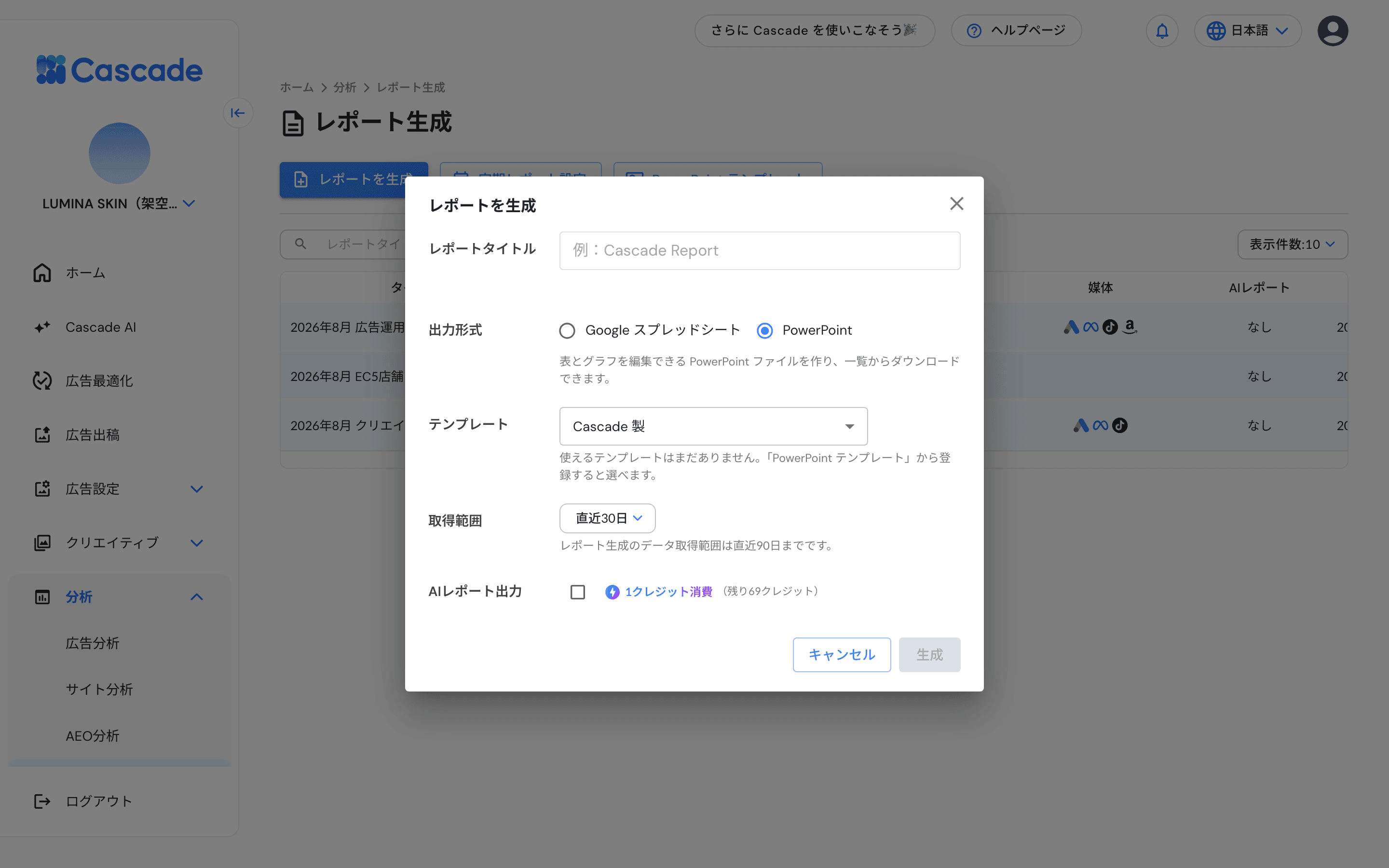
Cascade Generate Report screenCascade Add Scheduled Report screen

■ Overview

  • Features: Ad Analysis, chat notifications and Report Generation (features of "Cascade", the AI agent for ad operations)

  • Plan: Business plan (Site Analysis is available on all plans)

  • Roles: all roles, including Guests, can view reports. Report generation, scheduled reports and templates can be managed by Owners, Admins and Editors; chat integrations can be connected by Owners and Admins

  • Requirements: at least 1 connected ad platform for Ad Analysis; a Google Drive connection for Google Sheets reports

  • Details: https://cascaded.ai/en/features/analytics-reports

■ Comment from the CEO (Kazuki Miyauchi, CEO, Cascade Inc.)

"Spend less time gathering and formatting numbers, and more time deciding the next move. That is what Cascade's analytics features are built for. With morning notifications and automatically generated reports, we want every ad operations team to know where things stand without opening a dashboard."

■ Related pages

■ Contact

For questions about Cascade or its analytics and reporting features, please use the contact form. You can also book a demo to see the actual screens.

■ Company overview

Company name: Cascade Inc.

Representative: Kazuki Miyauchi

Headquarters: Amy Hall, 1-1-3 Shibuya, Shibuya-ku, Tokyo, Japan

Founded: February 2025

Business: Development and operation of Cascade / contract AI development and marketing consulting services

URL: https://cascaded.ai

Download the guide

Table of contents

Cascade sets
your marketing free

Cross-channel measurement, daily optimization, and reporting.
Cascade connects the pieces of ad management that used to live in silos.

News

Slack, Chatwork and Microsoft Teams notifications of yesterday's ad results, plus automatic Google Sheets / PowerPoint ad reports, added to cross-channel ad analysis

Table of contents

Cascade Analytics & Report Generation: cross-channel ad analysis, morning chat notifications and automatic reports

Cascade Inc. (Headquarters: Shibuya, Tokyo, Japan; CEO: Kazuki Miyauchi) has expanded the analytics features of "Cascade", its AI agent for ad operations. In addition to Ad Analysis, which compares the ad data of every connected platform in one dashboard, Cascade provides chat notifications (Slack, Chatwork and Microsoft Teams) that deliver the previous day's ad results every morning, and Report Generation, which automatically creates weekly and monthly ad reports in Google Sheets or PowerPoint.

▼ Analytics & Report Generation feature page
https://cascaded.ai/en/features/analytics-reports

■ Gathering numbers from every platform and explaining them takes too long

Ad data lives in separate interfaces for Google, Meta, TikTok, ChatGPT Ads and other platforms, so pinpointing where things are happening and explaining why they changed, to colleagues or clients, takes time. Cascade consolidates that scattered ad data automatically into a dashboard that compares channels on shared KPIs. Daily checks move to a morning chat message and reporting to automatically generated reports, cutting the time spent compiling and explaining.

Cascade Ad Analysis screen (analysis method cards and Analysis Report List)

■ Features: cross-channel ad analysis, morning notifications and automatic reports

① Ad Analysis: Performance Analysis, Segment Report and AI Analysis

Compare performance by ad platform, campaign, ad group and ad on shared KPIs, then drill down on the spot without switching screens. Alongside Performance Analysis, Ad Analysis offers Asset Analysis, Keyword Analysis, Placement Analysis, Ad Copy Analysis, Segment Report and LP Analysis, and Site Analysis offers Funnel Analysis, Conversion Path Analysis, Referral Analysis and Search Performance. Conditions can be saved as reports and shared with members. Segment Report breaks down performance by device, gender, age, region, day of the week and hour of the day, and the Day × Hour heatmap shows efficient times to run ads. Press the AI Analysis button, and the AI reads the data on display and explains in a summary which platform, campaign or creative drove the change.

Cascade Performance Analysis report screenCascade performance table with the AI Analysis button

② Chat notifications: yesterday's results, every morning

Connect Slack, Chatwork or Microsoft Teams to receive a summary of the previous day's ad performance every morning: spend, impressions, clicks, conversions, CPA and other metrics by ad platform. The message also includes Yesterday's Changes, Delivery Status and Platform Setting Changes sections and breakdowns by campaign and ad group, and each message links to the details in Cascade. Other notifications include AI optimization proposals, auto-apply and automation rule results, budget consumption and monthly budget pacing notices, ad review results and scheduled report results. Set up the connection per product: for Slack and Chatwork, select where to post; for Microsoft Teams, paste the webhook URL from a Teams workflow.

Morning summary of yesterday's ad performance delivered to Slack, Chatwork or Microsoft TeamsCascade Workspace Integrations (Slack, Chatwork and Microsoft Teams) in the Integrations settings

③ Report Generation: Google Sheets or PowerPoint, on demand or on a schedule

Select a period and a format to create an ad report on the spot. Reports include performance by ad platform, breakdowns by campaign and ad group with comparisons to the previous period, and performance by creative and by search term. Select Generate AI Report to add AI comments for each row. Google Sheets reports can also be downloaded in Excel format for members without Google accounts. Scheduled Reports run weekly or monthly for the period you choose and notify your connected chat service. Register your own presentation as a PowerPoint Template to generate reports with its cover, frames and color scheme.

Cascade Generate Report screenCascade Add Scheduled Report screen

■ Overview

  • Features: Ad Analysis, chat notifications and Report Generation (features of "Cascade", the AI agent for ad operations)

  • Plan: Business plan (Site Analysis is available on all plans)

  • Roles: all roles, including Guests, can view reports. Report generation, scheduled reports and templates can be managed by Owners, Admins and Editors; chat integrations can be connected by Owners and Admins

  • Requirements: at least 1 connected ad platform for Ad Analysis; a Google Drive connection for Google Sheets reports

  • Details: https://cascaded.ai/en/features/analytics-reports

■ Comment from the CEO (Kazuki Miyauchi, CEO, Cascade Inc.)

"Spend less time gathering and formatting numbers, and more time deciding the next move. That is what Cascade's analytics features are built for. With morning notifications and automatically generated reports, we want every ad operations team to know where things stand without opening a dashboard."

■ Related pages

■ Contact

For questions about Cascade or its analytics and reporting features, please use the contact form. You can also book a demo to see the actual screens.

■ Company overview

Company name: Cascade Inc.

Representative: Kazuki Miyauchi

Headquarters: Amy Hall, 1-1-3 Shibuya, Shibuya-ku, Tokyo, Japan

Founded: February 2025

Business: Development and operation of Cascade / contract AI development and marketing consulting services

URL: https://cascaded.ai

Cascade sets
your marketing free

Cross-channel measurement, daily optimization, and reporting. Cascade connects the pieces of ad management that used to live in silos.